I got an Arduino Uno starter kit for the grandson (Moose) to learn electronics with. The Arduino is a microcontroller that uses a programming IDE called Sketch. It is very simular to C++. This has been an interesting ride so far.
We started by playing an LED and getting it to dance as we saw fit. This taught us how to assign and control the ouputs of the Arduino.
We then moved on to playing with an orchestra of 13 LEDs. Then we moved to playing with a seven segment display.
This where things got messed up. The guide we were using had goofs in just about every program. I had helped Moose in figuring them out, but this was getting rediculous. I had Moose typing most of the code in by hand instead of copying the code from a pdf. This was to instil the syntax of programming. But most of the time when I couldn't find the error in the code, I resorted to the web for solutions or a whole other example code to use. This is how the rest of these projects went.
The seven sevment display proved challenging as it introduced the use of functions. These functions are alot like the old familiar subroutines from other programming environments.
We then moved on to a 4-digit segment display. That had just about used all of the I/O the Uno had. That is where the idea of getting the 74HC595 shift register to work. But, we had other playing to be had yet. This code was robbed from some forum online. As I also tried to get it to multitask 6 LEDs also.
I had found that the Arduino does not multitask, as it does not have an OS, but only a bootloader to allow the Sketch programming. In order to "multitask", we had to ditch the delay(x) commands, (witch just tells the processor to wait for the specified time. It does nothing during that time but kicking rocks.) and start managing time. So, in doing that, I got it to drive the 4-digit display with a counter and flash 6 LEDs without skipping a beat.
Saturday, July 25, 2015
Arduino Uno
Friday, April 17, 2015
Lego Minstorm EV3 mod
Well, I have gotten a Lego Mindstorm EV3 for the grandkids to learn programming. This is a start that will give them a very good start into this field. I have been playing with it for a few weeks now to make sure I get the hang of it so I can help them when and if they need it.
While I've been tooling around with different bots, (and also some very cool machine builds like one that scans and solves a Rubik's Cube), I have been learning alot. There are two annoying aspects of the EV3: 1) Batteries don't last long enough. 2) There is no backlight. So, I set out to tackle these issues.
There is a rechargable battery pack that is supposed to have longer life; I just haven't buckled down to get that, yet. I opted for a corded solution to help with some other projects I'm working on.
I got two dead AA sacraficial batteries, about 3ft of 20ga electrical bell wire, a scalpel (knife or wire strippers will work), and an EV3 brick.
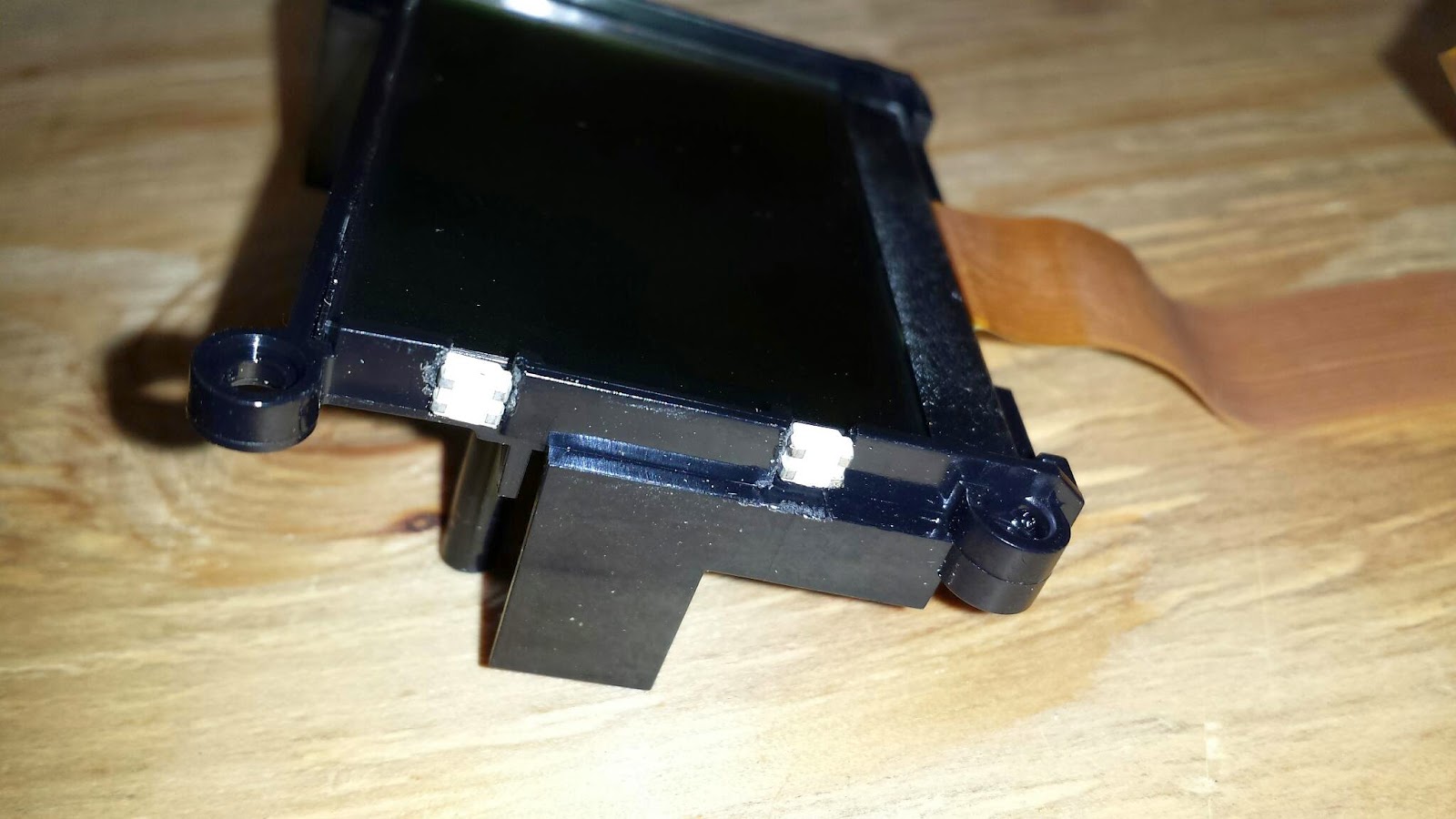
I sat down and ripped the brick apart, got the display out, and started to figure out what I could put where. I was hoping to get an Indeglo backlight and slide it behind the screen. Nope, that was not going to happen this time around. Double-sided adhesive foam is not known for coming apart. Plus I wasn't going to spend that kind of time on it atm. So, I opted to cut some plastic away on the left side of the screen cradle to make just enough room for two tiny surface mount leds I had laying around. This got interesting; as I was constantly in fear of slipping and scratching the lcd or breaking it entirely. I whittled away at the first notch (for what seamed like eternity). I got it done and the fitment of the led just right. I then started on the other one.
Once I got both leds in place, I soldered the wires needed and left about a six inch tail for both leads. I powered them up to ensure all the joints were good. And Vola! I had light. I reassembled the screen into the housing being careful of the wires and the leds (Hot glue would have been good!).
Now, I was on to find a good point to get power from off the EV3. I poured through schematics and probing the board. I tried the programming usb port, but nope. Not enough power there. I found that the full size usb port has a 5v supply, but I can't get to it to solder to it. The main board also doesn't seam to want to budge (More foam tape?). So, I'm going to install a surface mount transistor to automatically turn the LEDs on and off with the main power.
Stay tuned... I'm not finished yet.
Tuesday, March 25, 2014
Packing Machine
The programing software runs under dos and with my tablet running windows 8, that means running another program called DOSBOX in order for this Automate programing software to work. There's no real serial port on this tablet and I couldn't get my USB-to-Serial converter to connect to the Automate. I resorted to learning the programing software on my tablet, then write the program on the old Pentium desktop on a cart to program the Automate.
I have corrected the issues with the infeed table and made some other improvements to reliability of the machine such as stopping the rollers from running after 15 seconds of no product on the table. The operators are much happier that they now a flawless operation. They don't have to go play with the sensors trying to get the table to move. It all works as it was possibly intended. They can now just concentrate on packaging the product to ship, saving them time.
RV Bus
I got these things to work on the test bench and started working on WiFi access to the plc. WiFi access from any given spot was going to require more hardware so, I dropped that for now.
My brother (Jeff) and his girlfriend (Julie) had taken a vacation to the Grand Canyon. So, I did not get the chance to get anything installed. That gave me time to think about what else could be incorporated into this control system. That's when I thought about and auto-leveling control for the leveling jacks. I ordered some parts and made a leveling sensor plate to be mounted under the bus. I then got started on the programming. After finishing the program, they got back from vacation and decided to move to California. So, still no time to get the system installed. Over the next several weeks, I debugged and studied ways to refine the whole plc code.
I have been thinking of incorporating the environmental thermostat controls. Maybe even main engine and generator temps. Maybe I'll do it after the rest of the system is installed and fine tuned.
Stay tuned...
Sunday, February 16, 2014
Peabody
This machine is at my current employer and had an HMI that was removed at some point before my time. This meant that when the operator needed a particular option changed, it required an electrician to change a value in the plc memory via a pc with the program loaded.
I had talked about installing an HMI to change this option. Not too much time passed and I was told to do it.
I was then on a mission to see what it would take to do this job. The processor is a GE Fanuc Series One. I found that the DirectSoft koyo software was compatable with this. I go connected to it and was not too surprised with the ~100 blank lines of code in the program.
I studied the program after cleaning it up ad adding comments from the 1989 prints that I had found. I got a C-More HMI, that was removed from another machine, got it talking to the GE and setup the screen to change what the operator needed. I also found some error messages that were for the old HMI. I had to modify the plc program to set error numbers for the new HMI to show the same messages.
Now that all of that works, I had to move the HMI from the 'test' area to the operator's console where the old one used to be. Now, all is working just fine and I was able to keep the non-plc guys out of the program. This also frees up the electricians from making these changes every few hours.
Mixer #4
This mixer has had been moved from it's normal production area to a new production line for a whole different product. I was asked to retrofit this mixer like mixer #1.
As I started on this project and had the parts on order, the main voltage had been changed from 480v to 208v. That changes a few things and had to order other parts as the amperage is now going to be higher.
This mixer incorporated all of the previous experience I had with the mixer's operation and controls. The old panel was proprietary and mount to the side of the machine. All wiring still had to come from this spot. Not undoable, just different from the others.
I setup a new panel just like mixer #1 and control software ended being a mix of mixers 1 & 3, but with some aspects just for this mixer.
After debugging and ensuring the new system was working, I spent a few hours training the supervisor, operators, and maintenance personnel on the new controls.
I have had a few calls about this mixer not working, but found that the issues were not controls related, but rather bad motors or chafed wires at the motors. Those issues were repaired by the in-house maintenance dept.
Saturday, February 15, 2014
Multiple Swamp Coolers
After a recent conversation with the co-worker (Mark), he has decided to drop one of the three coolers. Now, I have removed the third cooler from the program. I have added another PID loop to control the second cooler from another thermocouple.
While making other tweaks and bug removals, I have found some things to work better and will do to my swamp cooler program.